
Functions:
AI That Runs Every Time You Drop
Set up context and a prompt once. Drop new notes on it forever.
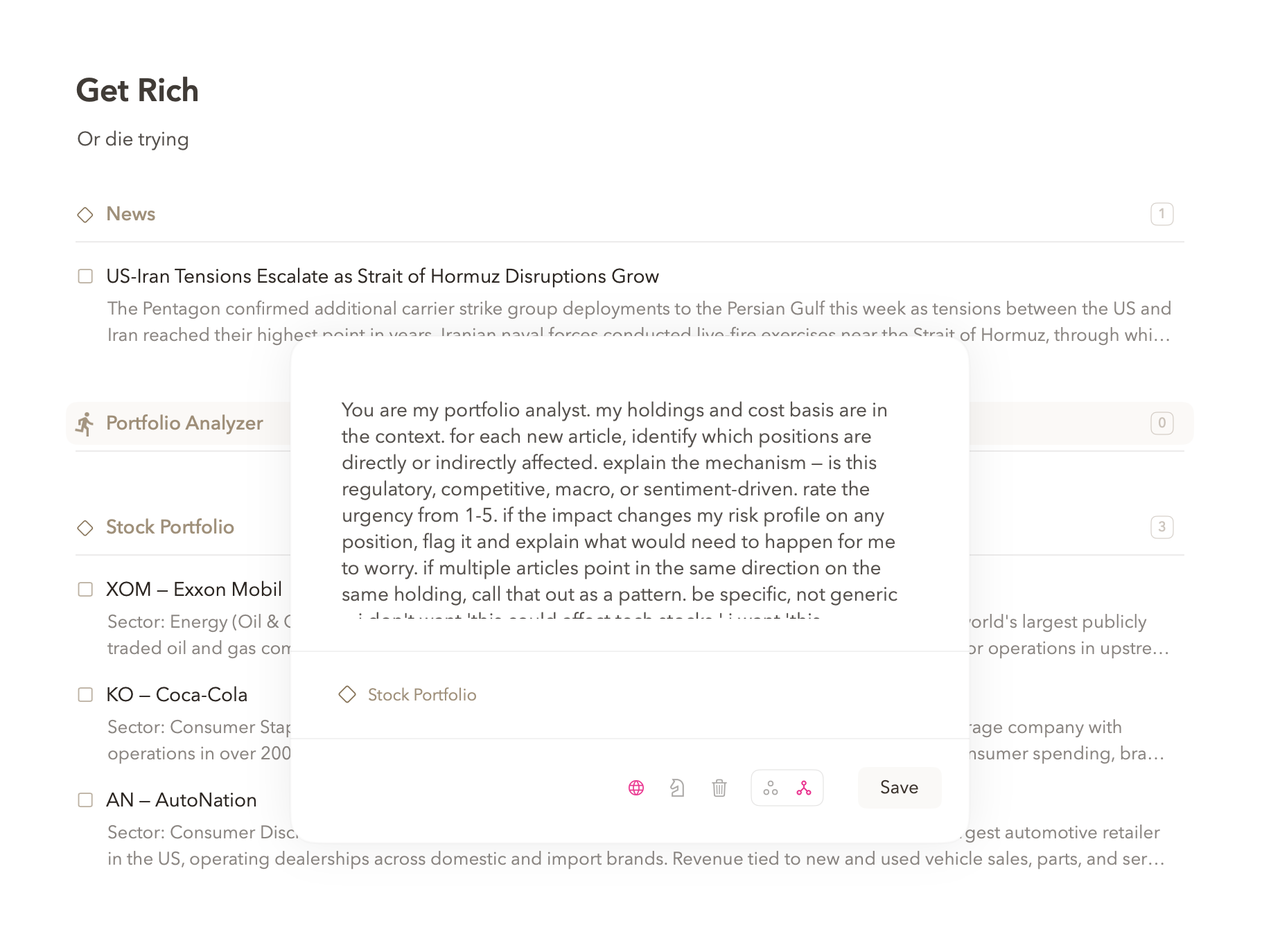
① Select notes as context. ② Write a prompt for what the AI should do.
③ Create a function from context + prompt. ④ Drop new notes onto it - function fires automatically.
HOW FUNCTIONS WORK
Context + Prompt + Drop = Automatic
A function is a section with a brain. You select notes as context - your stock portfolio, your brand guidelines, your research, whatever the AI needs to understand. Then you write a prompt: "for each new article, tell me which positions are affected." This creates a function section. Now, every time you drag and drop a new note onto it - an article, a tweet, a YouTube transcript - the function fires automatically. Your context and prompt run against the new note and you get results without lifting a finger.
Function context is intentional AI context. When a Function runs, Pachinko sends the saved context, prompt, and dropped notes to the AI provider you configured. Hide from AI keeps projects out of automatic discovery, but notes you deliberately select from hidden projects can still be part of a Function's context.
Select the notes, references, examples, or rules the function should carry into every job.
Describe the repeatable work once, in the voice and format you want to keep using.
Choose web search, thinking level, map, reduce, and whether raw inputs should stay around.
Send new material to the function whenever you want the same job done again.
FUNCTION SETTINGS
Fine-Tune How Your Function Processes Notes
Functions have controls that change what they know, how hard they think, and how they process what you drop on them. Start with context, then choose the processing behavior that matches the job.
Context
The material the function carries into every job: notes, references, examples, portfolio holdings, brand rules, or anything else the prompt needs.
Use when the answer should depend on your project, not generic model memory.Extended Thinking
Gives the AI more reasoning time before it writes. It is slower, but better for prompts that require comparison, judgment, or multi-step analysis.
Use when the output needs a real decision, not a quick rewrite.Web Search
Lets the function look outside your workspace during each run, so time-sensitive questions can use current sources instead of old context.
Use when prices, news, products, companies, or facts may have changed.Map
Runs the same prompt separately across each dropped item. Each article, note, job posting, or review gets its own pass.
Example summarize each article in one sentence.Reduce
Processes the dropped items together as one set. The function can find patterns, conflicts, consensus, or a single answer across the batch.
Example what do these five articles agree on?Auto-Delete
Trashes the dropped source after processing. Useful when the original item was just raw material and the output is what you want to keep.
Use when a function is acting like a pipeline, not an archive.Reduce is the default. Map transforms items one by one. Combine web search, extended thinking, and auto-delete for a more automated pipeline.
GETTING GOOD RESULTS
Refine Your Prompt, Catch Bad Outputs
Your first prompt won't be your best prompt. The point is to watch what your function produces and iterate. Hover over the function icon in your function section and an edit button appears - click it to refine the prompt. Drop a new note, see what comes back, adjust, repeat.
AI gets things wrong. It hallucinates facts, misses obvious points, and sometimes ignores your instructions entirely. Since every function output lands as a note in your workspace, you can read them like any other note - spot check a few, delete the ones that are wrong, and tighten your prompt if you see a pattern of bad output.
WHAT PEOPLE BUILD WITH FUNCTIONS
Set Up Once, Use Forever
SHARE YOUR FUNCTIONS
Export, Import, Swap
Built a function that works? Export it and send it to someone. Got a friend's function? Import it and run it on your own notes. Functions are portable - the context + prompt combo travels as a single file.
Review the context before you export. If the Function includes notes or sections from a project hidden with Hide from AI, those items travel in the export too.
WALKTHROUGHS